# load package "tibble"
library(tibble)
# load packages "sits" and "sitsdata"
library(sits)
library(sitsdata)
# set tempdir if it does not exist
tempdir_r <- "~/sitsbook/tempdir/R/vec_obia"
dir.create(tempdir_r, showWarnings = FALSE)
# Create a directory to store the data
tempdir_data <- "~/sitsbook/tempdir/data/Rondonia20LMR"
dir.create(tempdir_data, recursive = TRUE, showWarnings = FALSE)28 Object-based time series image analysis

Configurations to run this chapter
# load "pysits" library
from pysits import *
from pathlib import Path
# set tempdir if it does not exist
tempdir_py = Path.home() / "sitsbook/tempdir/Python/vec_obia"
tempdir_py.mkdir(parents=True, exist_ok=True)
# Create a directory to store the data
tempdir_data = Path.home() /"sitsbook/tempdir/data/Rondonia20LMR"
tempdir_data.mkdir(parents=True, exist_ok=True)
28.1 Introduction
Object-Based Image Analysis (OBIA) is an approach to remote sensing image analysis that partitions an image into closed segments which are then classified and analyzed [1]. For high-resolution images (1 meter or smaller), the aim of OBIA is to create objects that represent meaningful features in the real world, like buildings, roads, and water bodies. In the case of medium-resolution images (such as Sentinel-2 or Landsat), the segments represent regions of the image with similar spectral responses, which in general do not correspond directly to individual objects on the ground. These groups of pixels are called superpixels [2]. In both situations, the aim of OBIA is to obtain a spatial partition of the image into segments, each of which can then be assigned to a single class. When applicable, OBIA reduces processing time and produces labeled maps with greater spatial consistency.
The general sequence of the processes involved in OBIA in sits is:
Segmentation: The first step is to group together pixels that are similar based on a distance metric that considers the values of all bands in all time instances as well as their spatial location. We build a multitemporal attribute space where each time/band combination is taken as an independent dimension. Thus, distance metrics for segmentation in a data cube with 10 bands and 24 time steps use a 240-dimensional spectral space and a 2-dimensional Euclidean space. This distance includes both a spatial component (how far the pixel is from the center of the superpixel in terms of x and y coordinates) and a spectral component (how different the pixel’s spectral values are from the average values of the superpixel). The spectral distance is calculated using all the temporal instances of the bands. The result is a set of superpixels: clusters of spectrally similar, spatially close pixels that correspond to coherent object parts in the image.
Training set selection: Users should provide a training set, consisting of either labeled points or polygons. We suggest using QGIS to label some of the polygons produced by the segmentation algorithm. These labeled polygons can be used to produce a set of consistent labeled points, using
sits_get_data(). See more at “Time series from data cubes”.Model training: Using the training set produced in the previous step, users produce a classification model using
sits_train(). See more at Machine learning for image time series.Classification: The next step is to classify the image using the model produced in the previous step. This step uses
sits_classify(), which performs a pixel-based classification to obtain a set of probabilities. The segments are not used in the classification. They are saved for the next two steps: smoothing and labeling. Pixel-based classification is much faster than polygon-based classification and the results are equivalent.Smoothing: Smoothing for vector cubes uses a different definition of neighborhood than raster-based probability smoothing. When dealing with raster cubes, neighborhoods are defined based on rectangular windows (e.g., 9 x 9 size). When dealing with a vector cube, neighborhoods are defined by the segments. In this case, all pixels inside a segment are considered part of the same neighborhood. When estimating the spatial effects, the probabilities of all pixels in the segment are used to calculate the smoothed probability of each pixel.
Map labeling: Once the set of probabilities has been obtained for selected time series inside a segment, they can be used for labeling. To label the segments,
sitstakes the probabilities assigned to each pixel inside a segment and uses an aggregation function to calculate the estimated value of class probabilities for each segment. The aggregation functions available includemean,median, andmajority. After the aggregation,sitsselects the label of each segment based on the maximum aggregate value for the class probabilities. This step usessits_label_classification(), as shown below.
28.2 Image segmentation in sits
The first step of the OBIA procedure in sits is to select a data cube to be segmented and a function that performs the segmentation. For this purpose, sits provides a generic sits_segment() function, which allows users to select different algorithms. The sits_segment() function has the following parameters:
| Parameter | Meaning |
|---|---|
cube |
a regular data cube. |
seg_fn |
function to apply the segmentation |
roi |
spatial region of interest in the cube |
start_date |
starting date for the space-time segmentation |
end_date |
final date for the space-time segmentation |
memsize |
memory available for processing |
multicores |
number of cores available for processing |
output_dir |
output directory for the resulting cube |
version |
version of the result |
progress |
show progress bar? |
Currently, there are two segmentation functions available: (a) sits_snic, which implements the Simple Non-Iterative Clustering (SNIC) algorithm; (b) sits_slic, which implements an extended version of the Simple Linear Iterative Clustering (SLIC). Both are described below. We suggest using sits_snic since it is much faster than sits_slic and produces good results in general.
28.3 Simple non-iterative clustering (SNIC)
SNIC (Simple Non-Iterative Clustering) is a segmentation algorithm designed to partition an image into compact, uniform regions (superpixels) efficiently [3]. It is an evolution of the SLIC (Simple Linear Iterative Clustering) algorithm, described below. While SLIC relies on an iterative k-means approach (which requires multiple passes over the pixels), SNIC achieves similar or better results in a single pass using a priority queue, making it significantly faster and non-iterative.
SNIC treats image segmentation as a region-growing problem starting from a regular grid of seed points. It uses a priority queue to determine which pixel to process next, ensuring that regions grow in the “cheapest” direction first.
The algorithm can be summarized as follows:
Initialization: After choosing the data cube which will be segmented, users define the seed points (centroids) to be used to grow the superpixels. They can also choose their relative placement. The seeds can be placed on a rectangular, diamond or hexagonal grid, or can be placed randomly. A final parameter is the compactness, which defines how regular the shapes of the resulting superpixels are.
Priority Queue: Each pixel is represented in an n-dimensional feature space, defined by all the time instances of its spectral bands and its 2-D spatial position (\(x, y\)). The algorithm then creates a priority queue. Initially, the 4-connected neighbors of each seed are added to the queue. The “priority” (or cost) is the distance from the pixel to the seed’s centroid in the n-dimensional space.
Region Growing Loop, with the following steps:
SNIC initializes a label map — which tracks which superpixel each pixel belongs to — along with a corresponding distance map.
While the priority queue is not empty, the algorithm extracts the pixel with the smallest distance (lowest cost) from the queue.
If the pixel has already been labeled, it is discarded; otherwise, it is assigned to the superpixel of the seed that generated this queue entry.
SNIC updates the centroid of that superpixel immediately after adding the new pixel. The new centroid is the average of all pixels currently in that superpixel.
Unlabeled neighbors of the newly added pixel are added to the priority queue. Their cost is calculated based on the current (updated) centroid of the superpixel.
Go to step (b) until the priority queue is empty.
28.4 Simple linear iterative clustering algorithm (SLIC)
The Simple Linear Iterative Clustering (SLIC) algorithm [4] clusters pixels into nearly uniform superpixels. This algorithm has been adapted by Nowosad and Stepinski [2] to work with multispectral images. SLIC uses spectral similarity and proximity in the image space to segment the image into superpixels. Here’s a high-level view of the extended SLIC algorithm:
The algorithm starts by dividing the image into a grid, where each cell of the grid becomes a superpixel.
For each cell, the pixel in the center becomes the initial “cluster center” for that superpixel.
For each pixel, the algorithm calculates a distance to each of the nearby cluster centers, using the same distance metric as that of the SNIC algorithm.
Each pixel is assigned to the closest cluster. After all pixels have been assigned to clusters, the algorithm recalculates the cluster centers by averaging the spatial coordinates and spectral values of all pixels within each cluster.
Steps 3-4 are repeated for a set number of iterations, or until the cluster assignments stop changing.
The outcome of the SLIC algorithm is a set of superpixels which try to capture the boundaries of objects within the image.
28.5 Example of SNIC-based segmentation and classification
The SNIC implementation in sits uses the snic R package. The parameters for the sits_snic() function are:
| Parameter | Meaning |
|---|---|
grid_seeding |
spatial organization of initial grid seeds (one of rectangular, diamond, hexagonal, random). |
spacing |
distance (in number of pixels) between initial superpixels’ centers. |
compactness |
numerical value between 0 and 1 that controls superpixels’ density. Larger values cause clusters to be more compact. |
padding |
distance (in pixels) from the image borders within which no seeds are placed. |
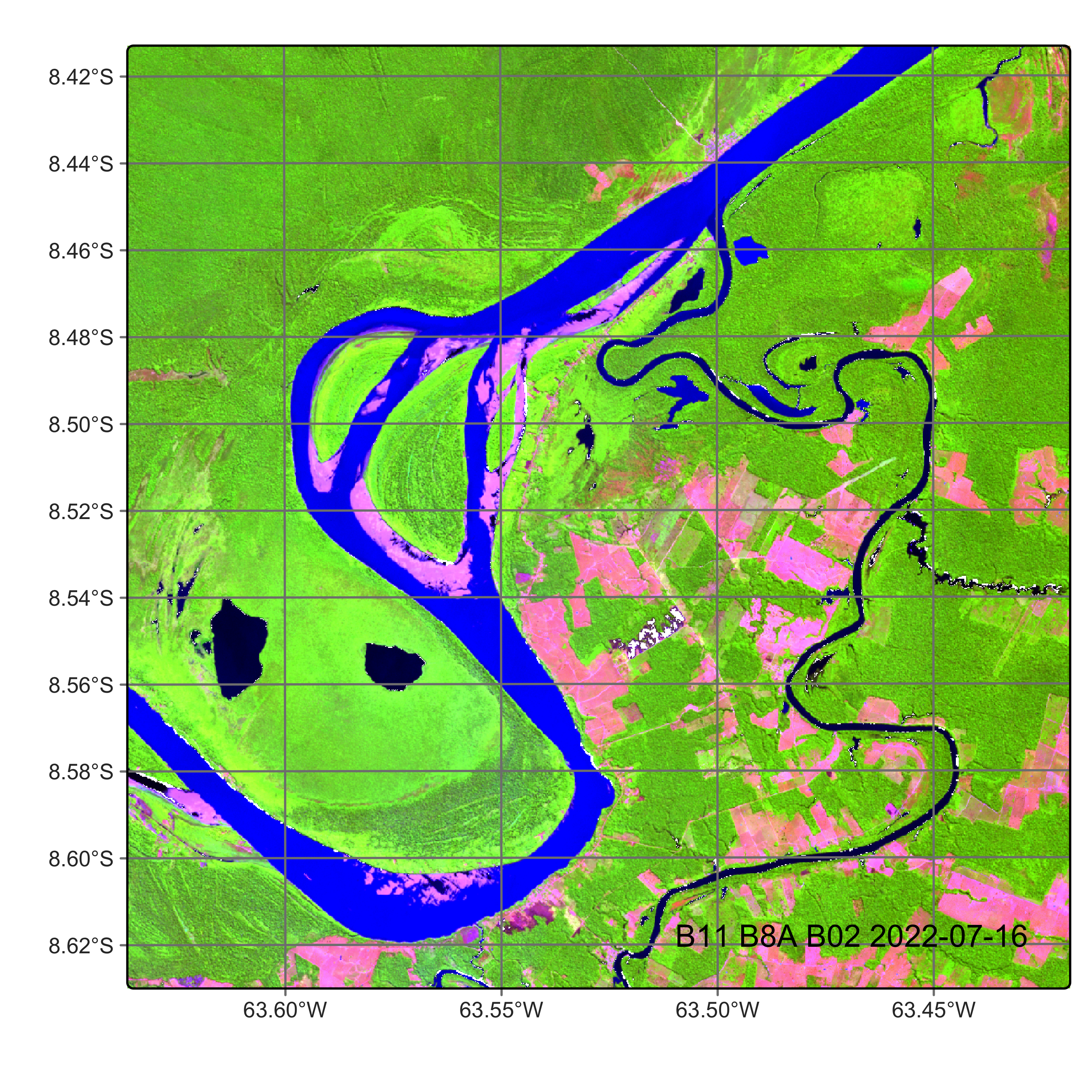
To show an example of SNIC-based segmentation, we first build a data cube, using images available in the sitsdata package.
#
# Read data cube from Hugging Face
cube_20LMR <- sits_from_hf(
    repo = "e-sensing/book_Rondonia20LMR",
    type = "dataset",
    output_dir = tempdir_data
)

# Plot
plot(
    cube_20LMR,
    red = "B11",
    green = "B8A",
    blue = "B02",
    date = "2022-07-16"
)
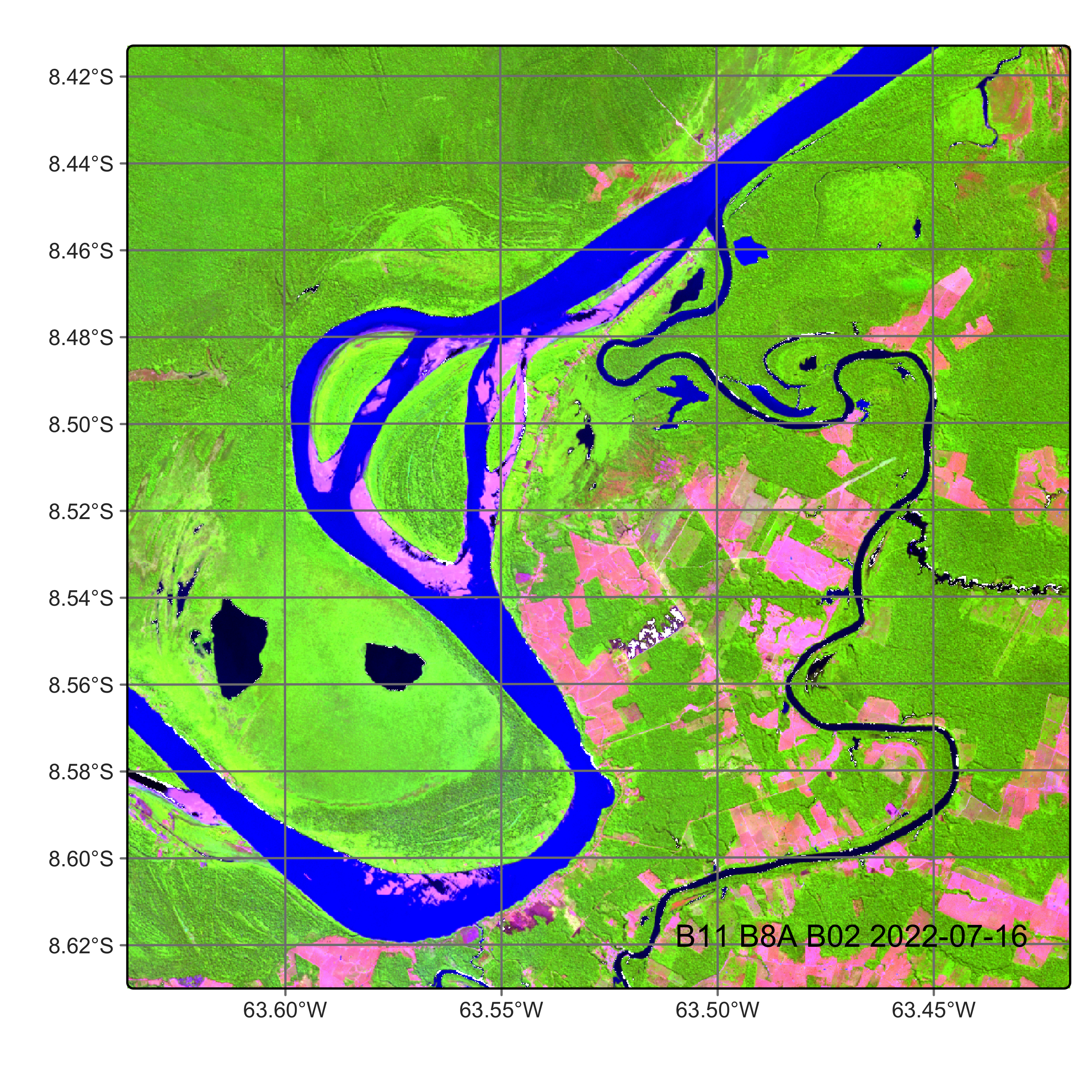
# Read data cube from Hugging Face
cube_20LMR <- sits_from_hf(
    repo = "e-sensing/book_Rondonia20LMR",
    type = "dataset",
    output_dir = tempdir_data
)

# Plot
plot(
    cube_20LMR,
    red = "B11",
    green = "B8A",
    blue = "B02",
    date = "2022-07-16"
)
The following example produces a segmented image. For the SNIC algorithm, we take the initial separation between cluster centers (spacing) to be 20 pixels, the compactness to be 0.5, and the minimum distance between the cluster center and the image borders (padding) to be 10 pixels.
# segment a cube using SNIC
# Files are available in a local directory
segments_20LMR <- sits_segment(
    cube = cube_20LMR,
    seg_fn = sits_snic(
        grid_seeding = "rectangular",
        spacing = 20,
        compactness = 0.5,
        padding = 10
    ),
    output_dir = tempdir_r
)

# Plot segments
plot(segments_20LMR, red = "B11", green = "B8A", blue = "B02",
     date = "2022-07-16")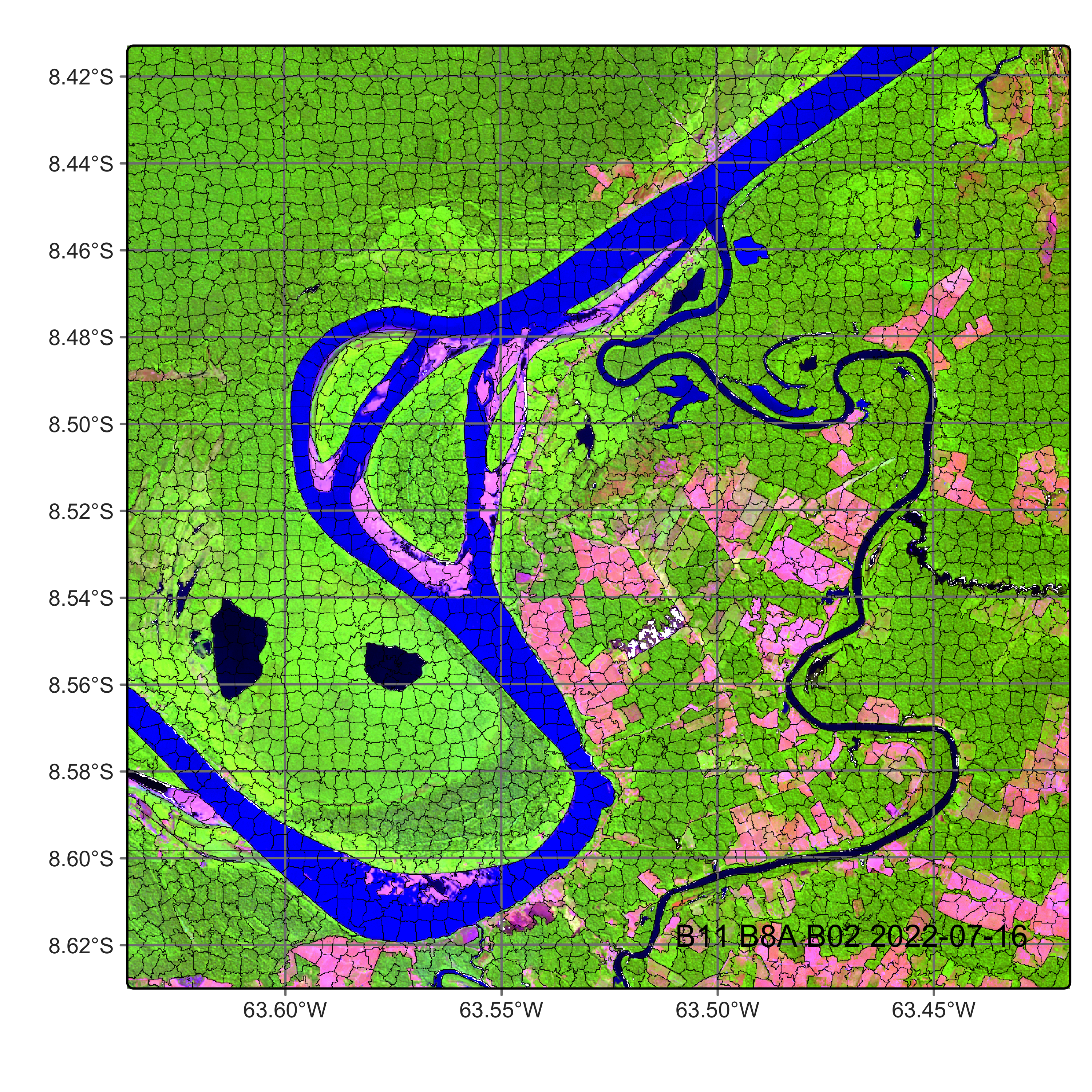
# segment a cube using SLIC
# Files are available in a local directory
segments_20LMR = sits_segment(
    cube = cube_20LMR,
    output_dir = tempdir_py,
    seg_fn = sits_snic(
        grid_seeding = "rectangular",
        spacing = 20,
        compactness = 0.5
    )
)

# Plot segments
plot(segments_20LMR, red = "B11", green = "B8A", blue = "B02", date = "2022-07-16")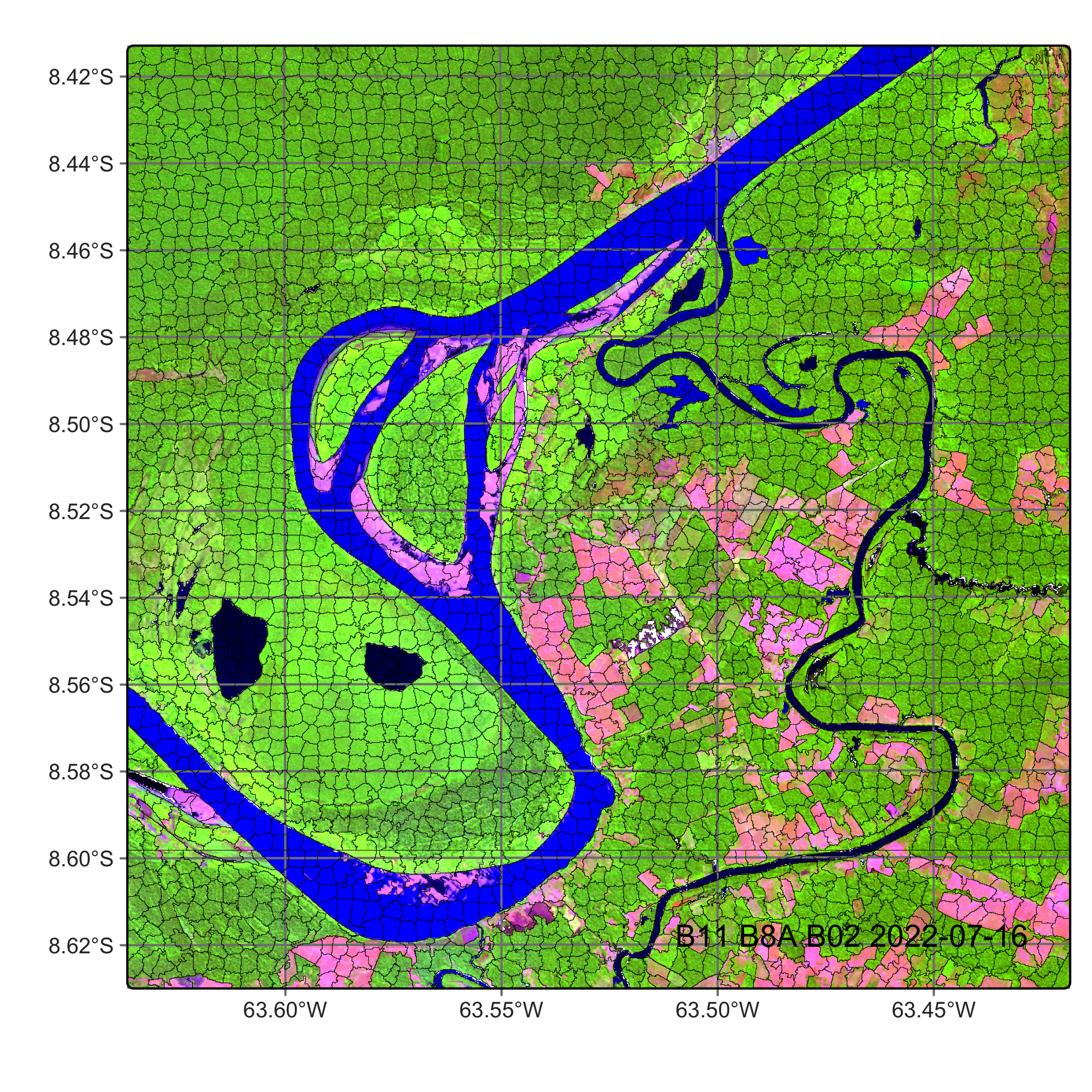
It is useful to visualize the segments in a leaflet together with the RGB image using sits_view().
sits_view(segments_20LMR, red = "B11", green = "B8A", blue = "B02",
          dates = "2022-07-16")
sits_view(cube_20LMR, red = "B11", green = "B8A", blue = "B02",
dates = "2022-07-16")
sits_view(segments_20LMR, add = TRUE)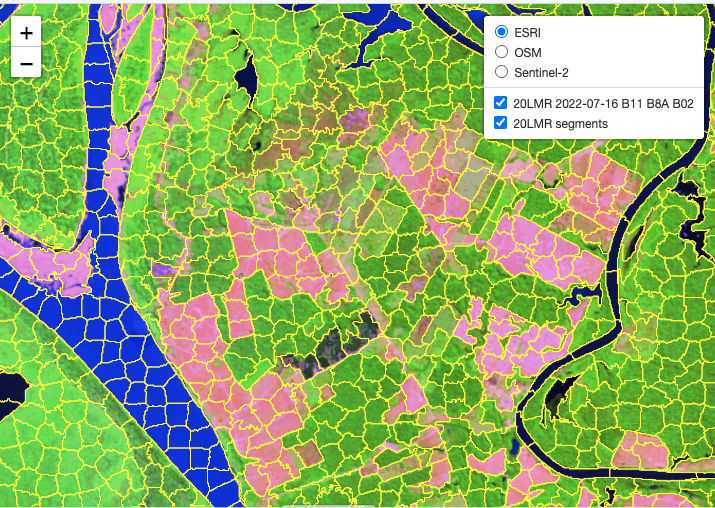
After obtaining the segments, the next step is to classify them. This is done by first training a classification model. This case study uses the training dataset samples_deforestation_rondonia, available in package sitsdata. This dataset consists of 6007 samples collected from Sentinel-2 images covering the state of Rondonia. There are nine classes: Clear_Cut_Bare_Soil, Clear_Cut_Burned_Area, Mountainside_Forest, Forest, Riparian_Forest, Clear_Cut_Vegetation, Water, Wetland, and Seasonally_Flooded. Each time series contains values from Sentinel-2A/2B bands B02, B03, B04, B05, B06, B07, B8A, B08, B11 and B12, from 2022-01-05 to 2022-12-23 in 16-day intervals. The samples are intended to detect deforestation events and have been used in earlier examples of the book. For the training, we select the same bands as those of the data cube.
To begin with, we retrieve the training data from Hugging Face.
# get the samples for deforestation in Rondonia from Hugging Face
samples_deforestation_rondonia <- sits_from_hf(
  repo = "e-sensing/samples_book",
  file = "samples_deforestation_rondonia.parquet",
  type = "dataset"
)
# load data
samples_deforestation_rondonia = sits_from_hf(
repo = "e-sensing/samples_book",
file = "samples_deforestation_rondonia.parquet",
type = "dataset"
)# Select bands
samples_deforestation <- sits_select(samples_deforestation_rondonia,
bands = c("B02", "B8A", "B11"))
# Train TempCNN
tcnn_model <- sits_train(samples_deforestation, sits_tempcnn())# Select bands
samples_deforestation = sits_select(samples_deforestation_rondonia,
bands = ("B02", "B8A", "B11"))
# Train TempCNN
tcnn_model = sits_train(samples_deforestation, sits_tempcnn())The segment classification procedure applies the model to every pixel inside each segment. Each pixel is then assigned a set of probability values, one for each class. The output of the procedure is a raster data cube containing a probability layer for each class. The parameters for the sits_classify() function for vector cubes are:
| Parameter | Meaning |
|---|---|
data |
either a data cube or a set of time series. |
ml_model |
a trained model that uses one of the machine learning methods provided. |
impute_fn |
an imputation function used to interpolate NA values (default = impute_linear). |
multicores |
number of CPU cores that will be used for processing (default = 2). |
memsize |
RAM memory available for classification expressed in GB (default = 4). |
gpu_memory |
GPU memory available for classification, expressed in GB, if a GPU is available and a torch-based model is used (default = 4). |
batch_size |
size of batches used for processing (default = 1000 x gpu_memory). |
roi |
Region of interest where pixels will be classified: either an sf object, a shapefile, or a numeric vector in WGS 84 with named XY values (“xmin”, “xmax”, “ymin”, “ymax”) or named lat/long values (“lon_min”, “lat_min”, “lon_max”, “lat_max”). |
exclusion_mask |
Areas to be excluded from the classification process, defined by either an sf object or by a shapefile. |
start_date |
Start date for the classification process. |
end_date |
End date for the classification process. |
output_dir |
Directory where results will be stored. |
version |
For version control. |
progress |
Progress bar to track processing steps. |
:: Parameters for sits_classify in case of vector cubes.
In what follows, we compute the probabilities for the classes and visualize them. Note that the probabilities are computed on a pixel-by-pixel basis. The segments are used only in the subsequent function (sits_smooth() and sits_label_classification()).
# Classify the vector cube using tempcnn model
segments_20LMR_probs <- sits_classify(
    data = segments_20LMR,
    ml_model = tcnn_model,
    output_dir = tempdir_r,
    gpu_memory = 8,
    memsize = 18,
    multicores = 6,
    version = "tcnn"
)
# Plot the probabilities for label Forest
plot(segments_20LMR_probs, labels = "Forest")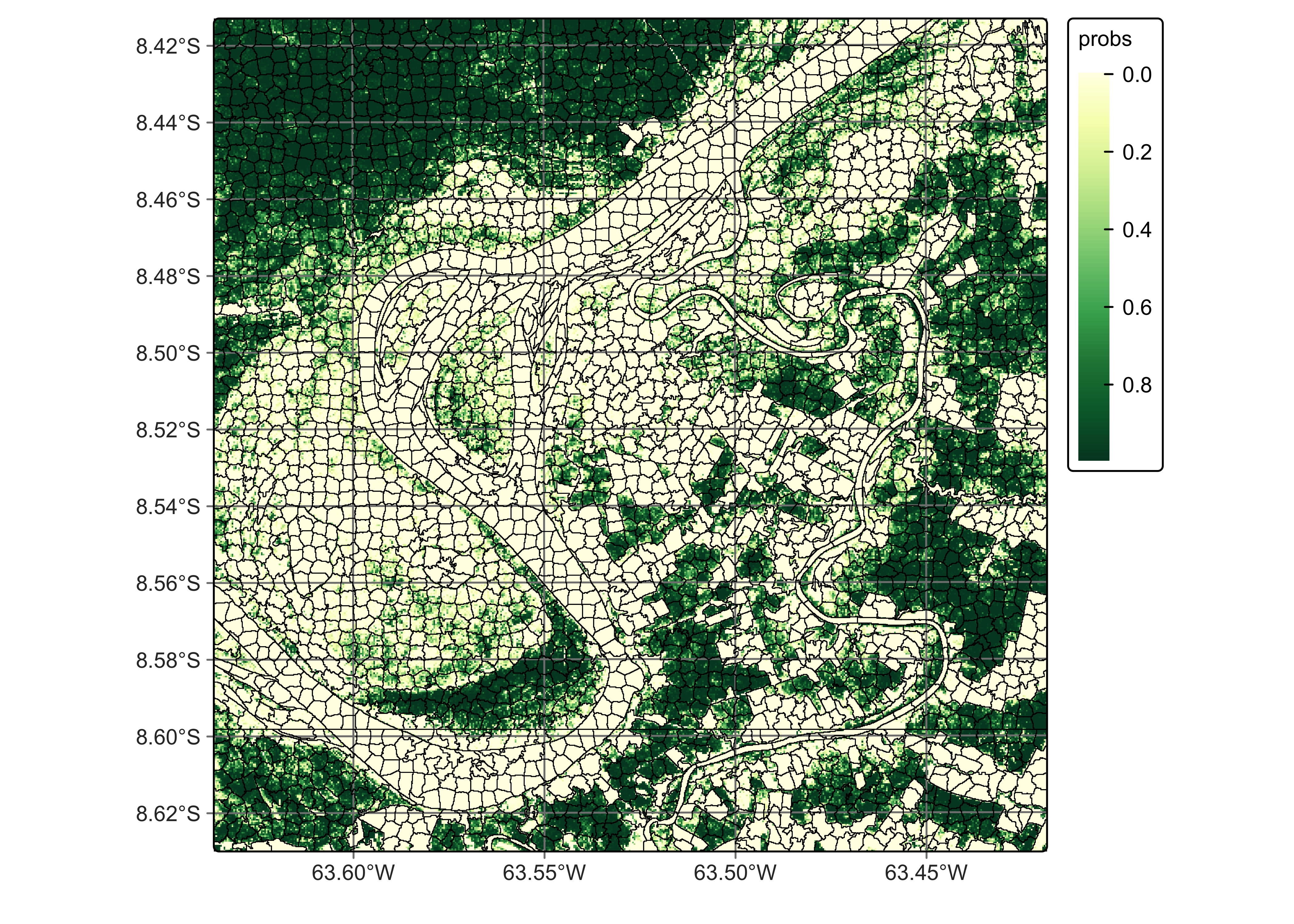
# Classify the vector cube
segments_20LMR_probs = sits_classify(
    data = segments_20LMR,
    ml_model = tcnn_model,
    output_dir = tempdir_py,
    gpu_memory = 8,
    memsize = 18,
    multicores = 6,
    version = "tcnn"
)
# Plot the probabilities for label Forest
plot(segments_20LMR_probs, labels = "Forest")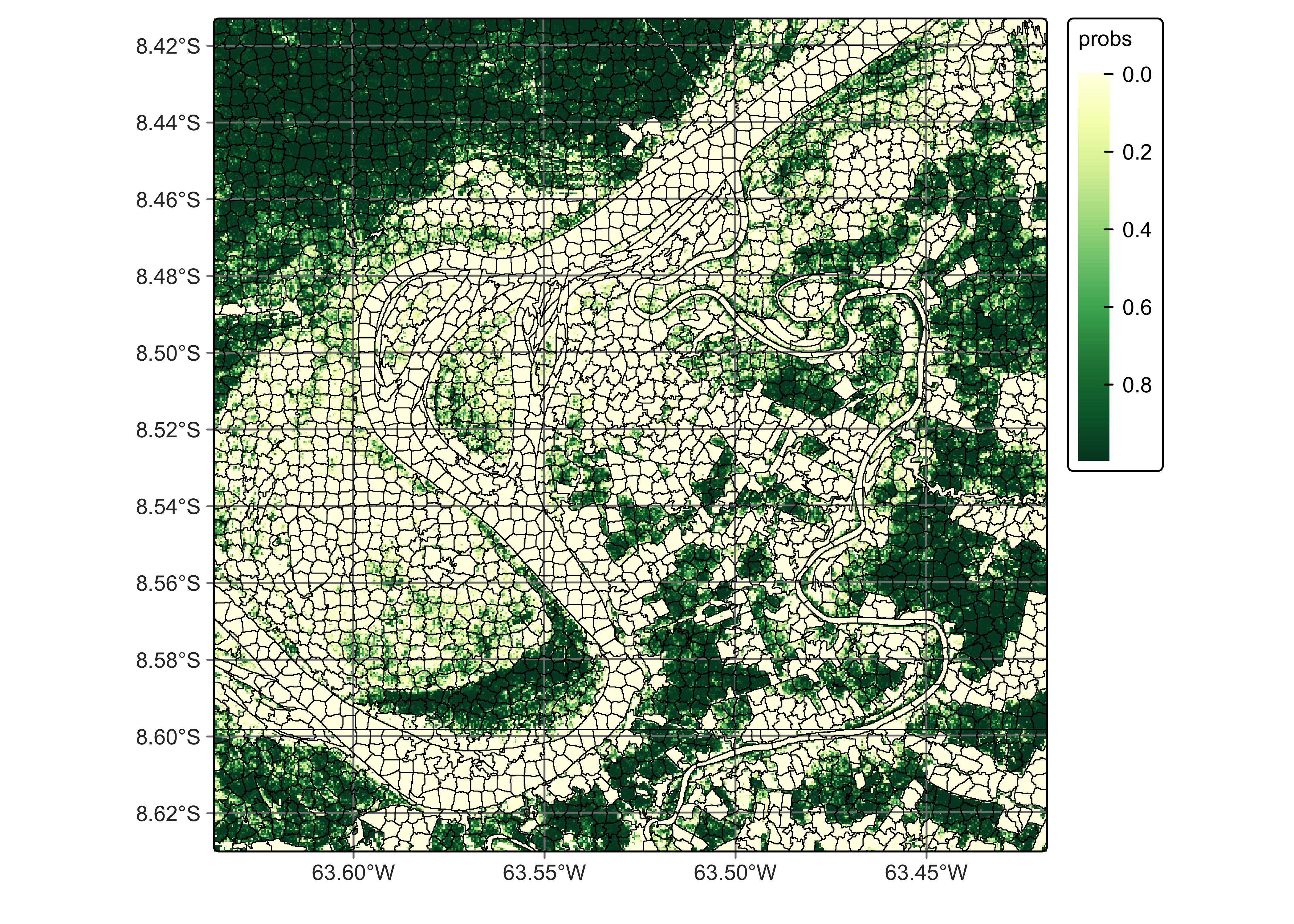
Then we can compute the smoothed probability cube. In the case of vector cubes, sits_smooth() works differently than the function does for pixel-based raster cubes. In the pixel-based case, users define a neighborhood as a fixed-sized window (e.g., 7x7 or 9x9 pixels). For vector cubes, each segment defines a neighborhood boundary. Inside the segment, sits_smooth() uses the neigh_fraction parameter to define the pixels that will be used to compute the resulting values. The smoothing method and the parameters are the same as described in the chapter “Bayesian smoothing for classification post-processing”; the only difference is the neighborhood definition. The parameters are:
| Parameter | Meaning |
|---|---|
cube |
Probability data cube to be smoothed; |
neigh_fraction |
Fraction of neighbors with high probabilities used in Bayesian inference (default = 0.5). |
smoothness |
Estimated variance of logit of conditional class probabilities (default = 20). |
exclusion_mask |
Areas to be excluded from the classification process, defined by either an sf object or by a shapefile. |
multicores |
number of CPU cores that will be used for processing (default = 2). |
memsize |
RAM memory available for classification expressed in GB (default = 4). |
output_dir |
Directory where results will be stored. |
version |
For version control. |
progress |
Progress bar to track processing steps. |
segments_20LMR_smooth <- sits_smooth(
    segments_20LMR_probs,
    output_dir = tempdir_r,
    neigh_fraction = 0.5,
    memsize = 18,
    multicores = 6,
    version = "tcnn"
)
segments_20LMR_smooth = sits_smooth(
segments_20LMR_probs,
output_dir = tempdir_py,
memsize = 24,
multicores = 6,
version = "tcnn"
)Finally, we can compute the most likely class for each of the segments. For vector cubes, there is one additional parameter: label_method, which is used to define how the probabilities inside a segment will be combined. The options are mean (default), median, or majority. Based on the chosen option, sits will compute the probability for each class inside a segment. Note that all pixels inside a segment will be assigned the same probability value for each class. After this step, the function labels the segment with the class with the highest combined probability.
The parameters used in sits_label_classification() in case of vector cubes are:
| Parameter | Meaning |
|---|---|
cube |
Probability data cube to be labeled; |
label_method |
Aggregation function for probabilities inside each segment (default = mean). |
multicores |
number of CPU cores that will be used for processing (default = 2). |
memsize |
RAM memory available for classification expressed in GB (default = 4). |
output_dir |
Directory where results will be stored. |
version |
For version control. |
progress |
Progress bar to track processing steps. |
# Label the smoothed probability vectors
segments_20LMR_class <- sits_label_classification(
    cube = segments_20LMR_smooth,
    label_method = "mean",
    memsize = 24,
    multicores = 6,
    output_dir = tempdir_r,
    version = "tcnn"
)
# plot the classified segments
plot(segments_20LMR_class, legend_position = "inside")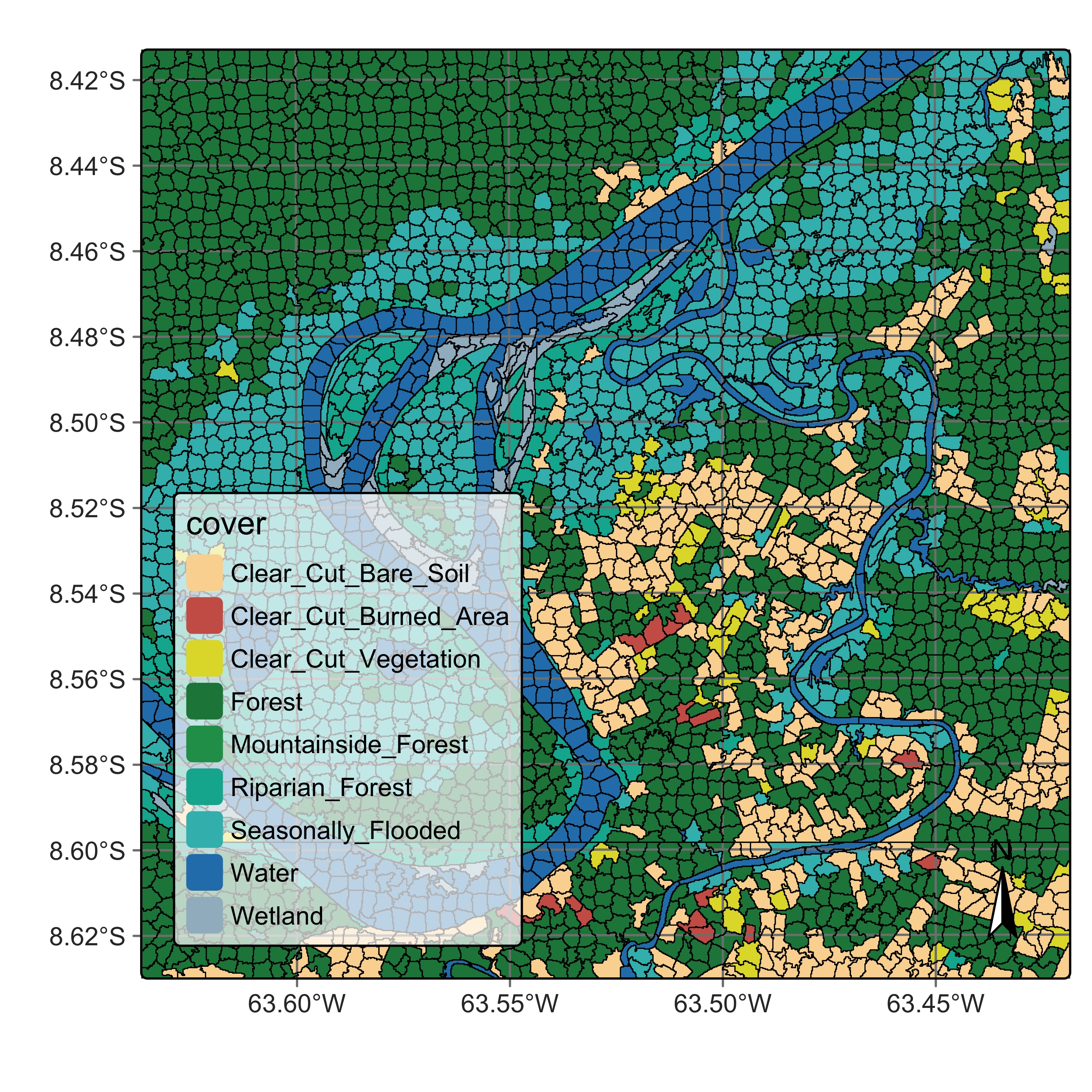
# Label the smoothed probability vectors
segments_20LMR_class = sits_label_classification(
    segments_20LMR_smooth,
    label_method = "mean",
    memsize = 24,
    multicores = 6,
    output_dir = tempdir_py,
    version = "tcnn"
)
# Plot the classified segments
plot(segments_20LMR_class, legend_position = "inside")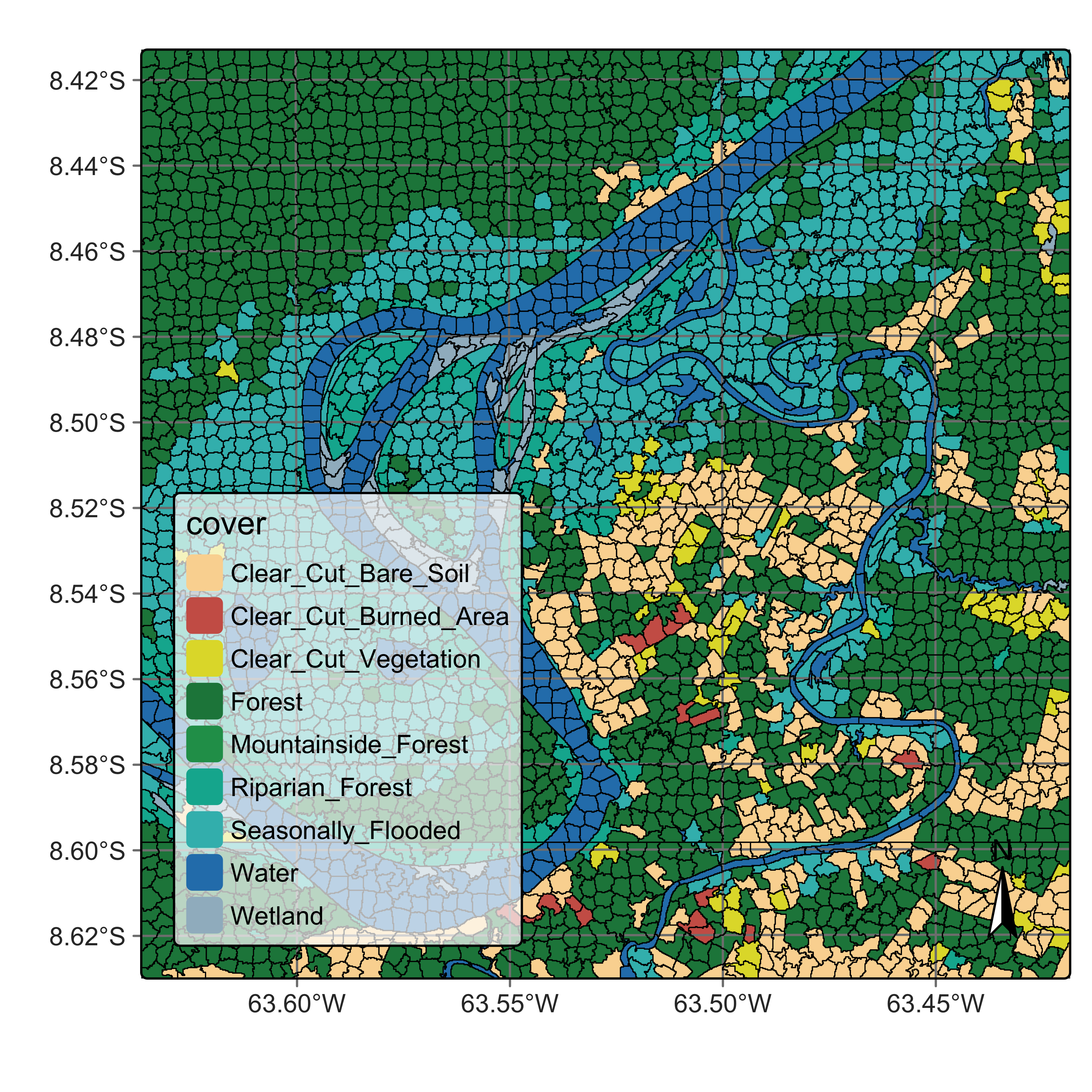
28.6 Summary
OBIA analysis applied to image time series is a worthy and efficient technique for land classification, combining the desirable sharp object boundary properties required by land use and cover maps with the analytic power of image time series.
References
[1]
T. Blaschke, “Object based image analysis for remote sensing,” ISPRS Journal of Photogrammetry and Remote Sensing, vol. 65, no. 1, pp. 2–16, 2010.
[2]
J. Nowosad and T. F. Stepinski, “Extended SLIC superpixels algorithm for applications to non-imagery geospatial rasters,” International Journal of Applied Earth Observation and Geoinformation, vol. 112, p. 102935, 2022, doi: 10.1016/j.jag.2022.102935.
[3]
R. Achanta and S. Süsstrunk, “Superpixels and Polygons Using Simple Non-iterative Clustering,” in 2017 IEEE Conference on Computer Vision and Pattern Recognition (CVPR), 2017, pp. 4895–4904, doi: 10.1109/CVPR.2017.520.
[4]
R. Achanta, A. Shaji, K. Smith, A. Lucchi, P. Fua, and S. Süsstrunk, “SLIC Superpixels Compared to State-of-the-Art Superpixel Methods,” IEEE Transactions on Pattern Analysis and Machine Intelligence, vol. 34, no. 11, pp. 2274–2282, 2012, doi: 10.1109/TPAMI.2012.120.